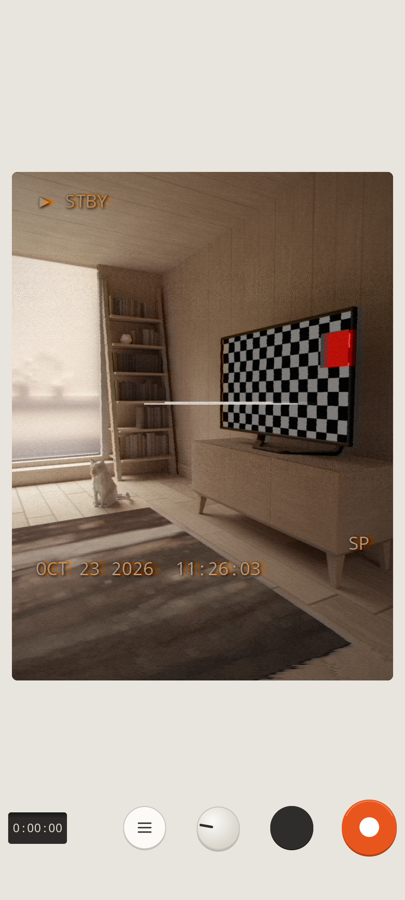
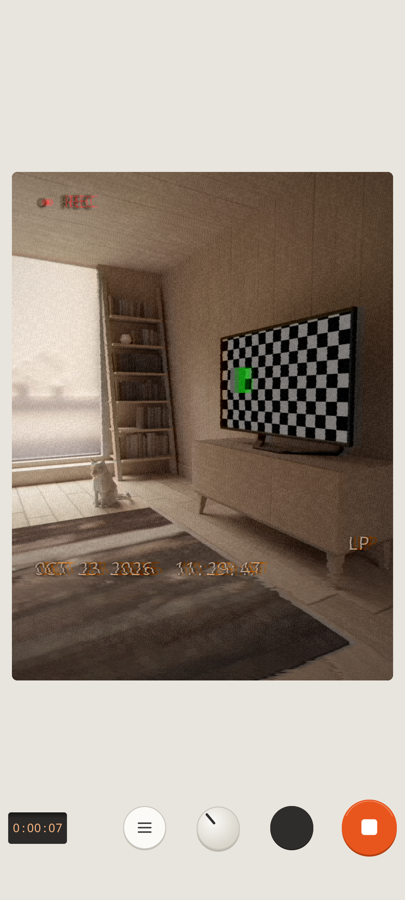
ViseoTape is a camcorder for your phone with a live VHS viewfinder. Colour bleed, tracking lines, head-switch noise and a date stamp, all in the picture while you film. No account, no ads, no subscription.
▶ Try it: this camcorder is live. Slide power, press REC, turn the dial.
ViseoTape
power
▶ STBYOCT 23 2026 11:18:04SP
zoom1.0×
tw
0:00:00timecode
cut
record
tape speed
mutedA working model of the app's controls, made for this page. It does not record anything, and the zoom range shown is an example: the real range depends on your phone's cameras.
The tour
The app's own welcome tour, right here.
These are the seven pages you see the first time you open ViseoTape, with the same wording and the same controls. Scroll, or use the keys.
muted
STEP 1 / 7
welcome to ViseoTape
Your phone, reborn as a 1990s VHS camcorder. Everything you shoot is recorded onto a tired old tape, live.
STEP 2 / 7
record and cut
Press the orange key to roll tape and again to stop. Tap cut for the classic pause glitch: picture and sound drop out for a moment.
STEP 3 / 7
zoom through every lens
Slide the fader to glide from ultra-wide through the main lens to a long zoom. The lenses switch for you, then it keeps going digitally.
STEP 4 / 7
choose a tape speed
Turn the dial. SP is a clean tape, LP and EP get noisier, WORN is a well-loved cassette and NEWS is crisp and bright.
STEP 5 / 7
make it yours
Open settings to shape the picture, tape, colour, on-screen date and sound: hiss, hum, crackle and more. Save favourites as presets and rename them.
STEP 6 / 7
titles, imports and light
Add start and end title cards, turn any video you already have into tape, and flip on the light when it gets dark.
STEP 7 / 7
you’re all set
Press record and make something that looks thirty years old.
SPLPEPWORNNEWS
Tape Lab
Drag the faders. Wreck the tape.
A miniature Tape Lab: the app's own tabs, sliders and switches driving a live model of the VHS look. Turn the dial to pick a tape mode, tweak it, then hold a user key to save your look.
▶ STBYOCT 23 2026 11:18:04SP
sptape speed
muted
Tap the picture to glitch it; the app does the same on touch and when you shake the phone. This is a browser model of the app's look, with the tabs and settings that change the picture. The app renders the real thing on your phone's GPU.
Title cards
Open and close your tape in style.
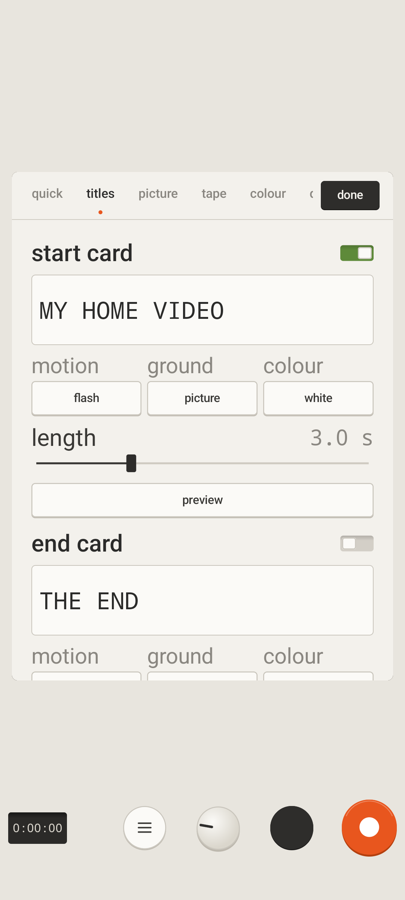
Type a title, pick a motion, ground and colour and watch it run, the way start and end cards play on your recordings and imports.
start card
motion
ground
colour
length 3.0 s
muted
In the app, each card has its own switch, and cards play at the start and end of recordings and imported videos.
Features
Everything a camcorder had. Minus the tape hassles.
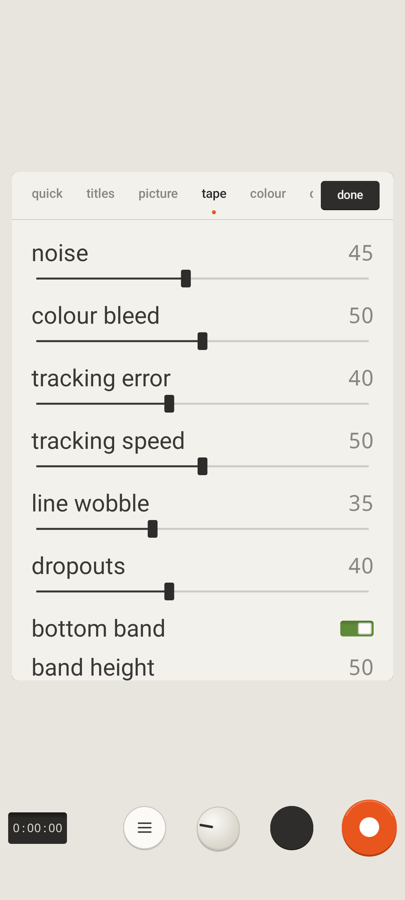
The look is built from how VHS misbehaves, and the settings let you dial each part up or down.
Live VHS viewfinder
The effect is drawn by a shader on your phone's GPU as you film: colour bleed, noise, tracking error, line wobble, a head-switch band at the bottom, dropouts, scanlines and a vignette.
Record to your camera roll
Video is encoded as H.264 with AAC sound and saved to DCIM/Camera, right next to your normal photos and videos.
Tape-filtered audio
Your microphone goes through a tape filter: muffle, wow & flutter and tape hiss, plus hum, crackle, audio dropouts and noise reduction, each with its own slider.
Convert existing videos
Press import video, pick a clip, and ViseoTape converts it with the same look and audio filter, with a progress bar and a cancel key.
Start and end title cards
Two cards, each with its own switch, text, motion (flash, scroll, type or slide), ground, colour and length, with a preview key.
Tape Lab
Settings in tabs: quick, titles, picture, tape, colour, display and audio. 34 sliders and switches in all, plus three presets of your own: tap to load, hold to save.
Date stamp and on-screen display
The camcorder date and time stamp, REC / STBY text and a tape-mode label. Change the stamp's size, colour and position, or type your own date text.
Pinch or fader zoom
Pinch, or slide the zoom fader. It moves across your phone's lenses first, then keeps going digitally.
Touch and shake glitch
Touch the picture or shake the phone and the tape tears. Set how hard it hits with the touch/shake glitch slider.
CUT
A key that blacks out the picture and drops the audio for a moment, the classic pause glitch.
Retro sounds
Quiet key, dial and switch sounds, and a tape-motor hum while a video converts, all synthesised on the phone. A sound / muted key switches them off.
Your videos stay yours
No account, no analytics, no ads. Your videos never leave your phone.
No accounts, no analytics, no ad networks. Recordings go to your camera roll and settings stay on the device. The only network use is a quick check that confirms your purchase with Google Play. Read the full privacy policy.
One purchase, plain terms
Pay once and it's yours: no subscription, no in-app purchases, no ads. The terms and conditions are short and written in plain language.
FAQ
Common questions
No, it works offline: the camera, the VHS look, recording and importing all run on your phone. The only network use is a quick purchase and security check with Google Play when the app opens. If that check can't finish, the app keeps working. See the privacy policy for exactly what it sends.
Straight into your phone's camera roll (DCIM/Camera) as ordinary H.264 + AAC video files, so they show up in your gallery and share like any other clip. Your videos never leave your phone unless you share them yourself.
Yes. Open settings, press import video and pick a clip with Android's own picker. ViseoTape converts it with the same look and the same tape audio filter, shows a progress bar you can cancel, and saves the result to your camera roll. Your start and end title cards are added if you have switched them on.
No. ViseoTape is US$2.99, paid once, with no ads, no in-app purchases and no subscription. There is no account to create.
Camera and microphone, so it can film and record sound, plus network access for the purchase check described above. There is no location, contacts or storage permission. Videos you import are chosen with Android's own picker, and recordings are saved through Android's media storage.
Google Play then reports that your account no longer owns the app, and ViseoTape locks. Recordings you made stay on your phone. If the check just can't be completed (offline, for example), the app keeps working.
The whole app: the live VHS viewfinder, recording, import and convert, title cards, Tape Lab and its presets. There are no extra unlocks to buy.
Ready to roll
Make today look like a home movie.
ViseoTape is on Google Play for US$2.99. Questions first? Email us any time.
 ViseoTape